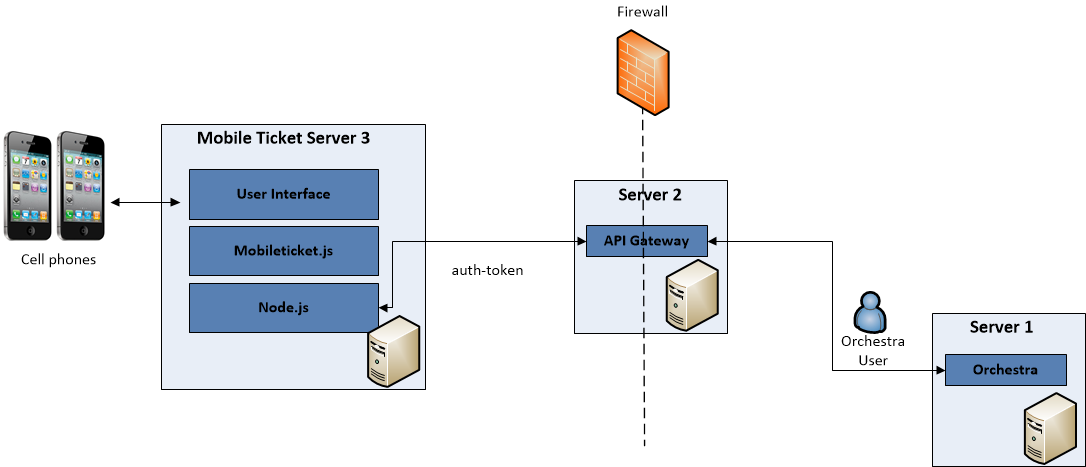
File / folder | Sub folder | Contents Description | |
|---|---|---|---|
sslcert | This folder contains a script called create_cert.sh. This folder is also where you should place your certificate, if your server is supporting SSL. This is defined in the proxy-config.json file. | ||
node_modules | iconv-lite | These sub folders contain parsers, http-proxy, readme-files etc. | |
express | |||
express-http-proxy | |||
raw-body | |||
unpipe | |||
proxy-config.json | This is where you specify the API Gateway Host address, local webserver port, etc. For more information, see “Installation and Basic Configuration - Node.js / Mobile Ticket” . | ||
server.js | Main script file to start the solution. | ||
src | app | This folder contains the following sub folders: • config - This folder contains the config.json file, where you specify the branch radius, where you find the current version number of Mobile Ticket, and so on. For more information, see “Basic Configuration - Mobile Ticket Web Application” . • locale - This folder from start only contains the file en.json and this is where you place your translated language files, if applicable. For more information, see Localization. • resources - In this folder, you find graphical resources used, such as fonts, images, and buttons. A few of these are then pointed out from the theme-styles.css file. Here, you can also find the sound file notification.mp3, which is pointed out from the config.json file. • theme - This folder contains the file theme-styles.css, a Cascading Style Sheet file defining for example font color, accent color, and logotype. | |
zip | This folder contains the files bundle.min.css.gz and bundle.min.js.gz. | ||
The files favicon.ico and index.html | |||
 Please note that upgrade, in the proper sense of the word, is not supported by Qmatic. The upgrade procedure actually consists of installing a newer version of the software.